
Download Zensors – AI‑Powered Visual Recognition Platform for Business Intelligence
Overview
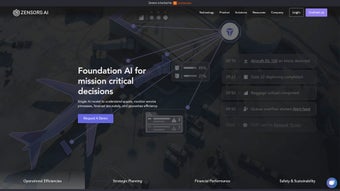
Zensors is an advanced AI platform that transforms how businesses interact with their physical spaces. By harnessing visual recognition technology and spatial intelligence, Zensors turns ordinary security cameras, CCTV feeds, and other existing hardware into powerful data collection points. The platform’s AI agents analyze video streams in real time, delivering actionable insights such as activity monitoring, utilization management, and object counting—all while preserving visitor anonymity.
Whether you operate in aviation, retail, commercial real‑estate, or any sector where space usage matters, Zensors provides a unified dashboard that highlights patterns, predicts bottlenecks, and suggests immediate actions to boost revenue and productivity. Its cloud‑native architecture ensures seamless updates, secure data handling, and scalability from a single store to a multinational portfolio. In short, Zensors converts visual data into strategic intelligence, enabling decision‑makers to react faster, allocate resources more efficiently, and ultimately deliver a superior customer experience.
Key Features and Functionalities
- Real‑Time Activity Monitoring: Detects foot traffic, queue lengths, and dwell times, allowing managers to adjust staffing or layout on the fly.
- Utilization Management: Provides heat‑maps and occupancy analytics for workspaces, parking lots, or retail aisles, helping optimize space allocation.
- Object Counting & Classification: Counts people, vehicles, or specific items (e.g., shopping carts) with high accuracy, supporting inventory and loss‑prevention strategies.
- Anonymized Data Capture: Utilizes edge‑processing to blur faces and strip personally identifiable information, ensuring GDPR and CCPA compliance.
- Custom AI Agent Builder: Allows organizations to train bespoke models for industry‑specific scenarios such as runway safety in aviation or lease‑expiry detection in real‑estate.
- Integration Hub: Connects with ERP, CRM, and BI tools via REST APIs, Webhooks, or native connectors for seamless workflow automation.
- Scalable Cloud Infrastructure: Offers auto‑scaling compute resources, multi‑region redundancy, and end‑to‑end encryption for enterprise‑grade reliability.
- Insight‑Driven Alerts: Push notifications and automated reports trigger when thresholds (e.g., overcrowding) are breached, enabling proactive response.
Why These Features Matter
The power of Zensors lies not just in its technical capabilities but in the business outcomes they drive. Real‑time activity monitoring, for instance, reduces wait times in airports by up to 30%, directly influencing passenger satisfaction scores. Utilization management helps retail managers reposition high‑margin displays to zones with the highest footfall, increasing average transaction value.
Object counting supports accurate staffing forecasts, cutting labor costs without sacrificing service quality. Moreover, the platform’s commitment to privacy builds trust with customers—a critical differentiator in today’s data‑sensitive market. By offering a flexible AI agent builder, Zensors ensures that niche requirements—such as detecting safety‑critical incidents on an aircraft tarmac—can be addressed without extensive custom development.
All these capabilities converge into a single, secure dashboard, turning raw video into a strategic asset.
Installation & Usage Instructions
Getting started with Zensors is designed to be straightforward, even for organizations with limited AI expertise. Follow these steps to download, install, and begin extracting value from the platform:
- Create an Account: Visit the official Zensors website, click “Sign Up,” and complete the verification process. You’ll receive a welcome email with a secure activation link.
- Choose a Deployment Option: Zensors offers both cloud‑hosted SaaS and on‑premises containers (Docker/Kubernetes). For most businesses, the SaaS model provides instant scalability and automatic updates.
- Connect Existing Hardware: Install the Zensors Edge Agent on any IP‑camera or NVR that supports RTSP streaming. The agent runs on lightweight Linux, automatically detects video feeds, and begins anonymized processing at the edge.
- Configure Data Streams: In the web dashboard, map each camera to a “zone” (e.g., “Check‑in Lobby” or “Warehouse Aisle 3”). Assign AI agents to zones based on the insights you need—people counting, queue detection, or custom object classification.
- Set Alert Thresholds: Define rules such as “Notify when occupancy exceeds 80% for more than 5 minutes.” Alerts can be sent via email, SMS, or integrated with Slack and Microsoft Teams.
- Generate Reports: Use the built‑in reporting engine to schedule daily, weekly, or monthly analytics PDFs. Export data to CSV for deeper analysis in Power BI or Tableau.
- Iterate and Optimize: Leverage the “Model Training” tab to upload labeled footage, fine‑tune AI agents, and improve detection accuracy for unique use cases.
The entire onboarding process typically takes less than 48 hours for a standard deployment, thanks to Zensors’ intuitive UI and comprehensive documentation. Support is available 24/7 via chat, email, and a dedicated customer success manager for enterprise plans. Regular software updates are pushed automatically in the SaaS environment, ensuring you always have the latest security patches and AI improvements without manual intervention.
Compatibility, Pros & Cons
Zensors is platform‑agnostic on the client side because the heavy lifting occurs in the cloud or on edge devices that run a minimal Linux distribution. The web dashboard works on any modern browser (Chrome, Edge, Firefox, Safari) across Windows 10/11, macOS Monterey and later, as well as Linux desktops. For mobile access, native iOS (13+) and Android (8+) apps provide real‑time alerts and quick view of key metrics. The on‑premises option supports Docker‑based deployment on Windows Server, Ubuntu, or any Kubernetes‑compatible environment, giving IT teams full control over data residency.
Pros
- Zero‑Hardware Investment: Leverages existing cameras, eliminating costly sensor installations.
- Privacy‑First Architecture: Edge processing ensures personal identifiers never leave the premises.
- Scalable Cloud SaaS: Instantly add new locations without worrying about infrastructure.
- Customizable AI Models: Tailor detection to industry‑specific objects and events.
- Rich Integrations: Seamlessly connects with major ERP, CRM, and BI platforms.
- Fast ROI: Users report measurable revenue uplift and labor savings within the first quarter.
Cons
- Initial Learning Curve: Setting up custom AI agents may require basic data‑labeling knowledge.
- Dependence on Network Bandwidth: Real‑time streaming to the cloud can strain limited internet connections; edge‑only mode mitigates this but adds complexity.
- Pricing Model: Subscription fees are usage‑based; very large deployments may need a negotiated enterprise contract.
Frequently Asked Questions
Is Zensors compatible with legacy analog cameras?
Yes. By attaching an inexpensive video encoder (e.g., a VDOIP or HDMI‑to‑IP converter), analog feeds can be streamed as RTSP, which Zensors Edge Agent can ingest and process.
How does Zensors ensure data privacy and compliance?
All video frames are anonymized at the edge before any data leaves the premise. Faces are blurred or pixelated, and no raw footage is stored in the cloud. The platform complies with GDPR, CCPA, and ISO/IEC 27001 standards.
Can I integrate Zensors alerts with my existing security system?
Absolutely. Zensors supports Webhooks, MQTT, and direct API calls, allowing you to trigger alarms, lock doors, or launch camera recordings in your current security infrastructure.
What is the typical latency for real‑time analytics?
In cloud SaaS mode, latency averages 1‑2 seconds for standard object detection. Edge‑only deployments can achieve sub‑second response times, ideal for time‑critical scenarios.
Is there a free trial or sandbox environment?
Zensors offers a 14‑day free trial with up to three camera licenses. A sandbox environment is also available for developers to experiment with custom AI models without affecting production data.
Conclusion & Call to Action
Zensors stands out as a versatile, privacy‑centric AI platform that converts visual data into actionable business intelligence. Its ability to work with existing camera infrastructure, coupled with robust analytics and real‑time alerts, makes it a compelling choice for any organization looking to optimize space utilization, enhance customer experiences, and drive revenue growth. While there is a modest learning curve for custom model creation and a reliance on solid network connectivity, the platform’s scalability, secure design, and rapid ROI outweigh these considerations for most enterprises. If you’re ready to turn every square foot of your operation into a data‑driven asset, download Zensors today, start your free trial, and see how spatial intelligence can reshape your business landscape.



.png)



